Secrets Of Mosfet Cross Reference and Replacement Guide
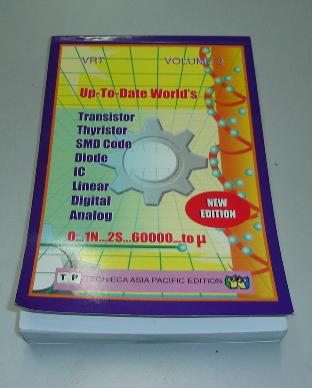
A Semiconductor Replacement Guide Searching for the right mosfet cross reference or datasheet, one has to look for a semiconductor transistor replacement data book and not the Philip ECG master replacement guide. Almost all the transistor replacement book will published out the specification of a particular components such as type of component it belong whether it is a fet, scr, bipolar transistor, horizontal output transistor and also the voltage, ampere, wattage, ohm, frequency and suggested substitution part number. From my experienced, the substitution part number that was recommended by the data book is not always 100 % match. If you have the time, I would like to suggest to you that, find the right part number by yourself rather than depending on the transistor data book.
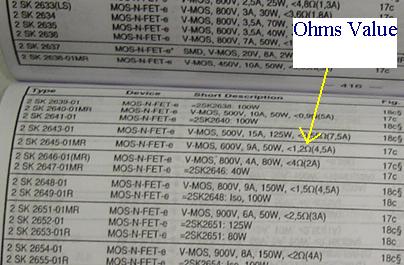
It is the same when you look for horizontal output transistor (HOT) specification which doesn't mean that the bigger specification, the better the substitution part number is. In searching for Mosfet cross reference, you have to look at the ohms value which is provided by the transistor data book besides the specification of voltage, ampere and the wattage. The replacement, besides the same or higher in voltage, ampere and wattage, one should also consider the ohms value. The ohms value has to be as close as possible.
Arrow is showing the mosfet ohms value in a transistor substituion book If the original fet part number is 1 ohm then a good replacement mosfet must have the ohm values between of 0.5 to 1.5 ohm. Do not substitute it with a too high or too low ohms value as this will make the mosfet run warmer and eventually blow the mosfet itself. Even though you can get a replacement with a higher voltage, ampere and wattage, if the ohms value is too low or too high, the mosfet will still burnt after on for quite a while.
It runs well for sometimes before it breakdown again. After two weeks the customer brought back the printer with the same complaint which is no power. Upon checking the power side I found the same mosfet gave up again. Substituting with another mosfet part number that have a similar specification especially the ohms value solved the printer no power symptom. Specification with larger voltage, ampere and wattage don’t guarantee that the replacement mosfet will work. So, taking the mosfet ohms value into consideration, you will have a higher chances to repaired the equipment and sometimes the replacement mosfet will also last longer. |
Astra: Control Panel
As stateful workloads continue to dominate the Kubernetes landscape, standard backup utilities are no longer sufficient. The Astra Control Panel provides the enterprise-grade reliability, security, and flexibility required to manage cloud-native data at scale. By unifying data protection, disaster recovery, and application mobility into a single control plane, it allows organizations to focus on innovation rather than infrastructure survival.
This is the flagship feature. When you select an application (e.g., "MongoDB-shard-01"), Astra automatically identifies all associated resources. It then quiesces the application (flushes memory to disk) before taking a snapshot. This prevents database corruption. You can schedule backups (hourly, daily, weekly) and retain them according to compliance rules (e.g., 30-day retention). astra control panel
Pro-tip: Clicking on a node reveals live metrics like CPU pressure, memory usage, and commit log latency without switching screens. As stateful workloads continue to dominate the Kubernetes
Copyright@ 2006-2014-www.ElectronicRepairGuide.com All Rights Reserved